
Portfolio Module lists all the open positions we record in our system in regards to the user`s permissions. By setting the right order of columns and filters it can give you an insight into desired entity`s financial activities etc.
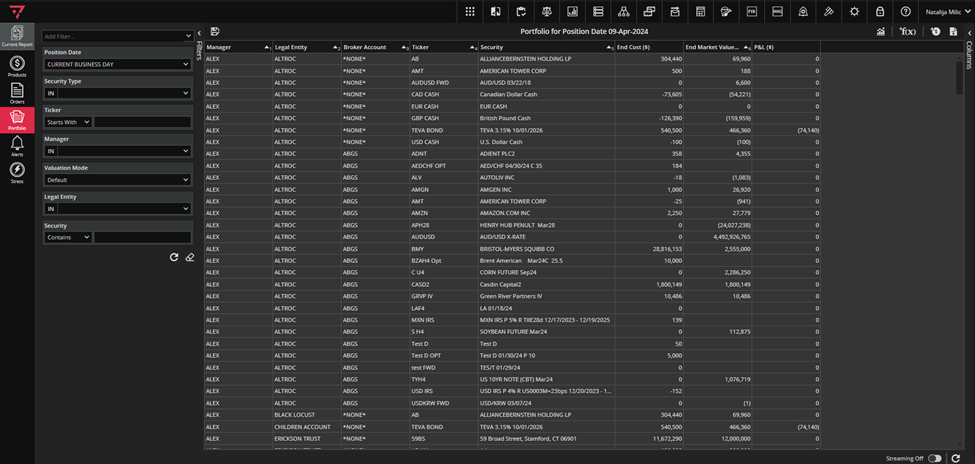
Your portfolio might include any combination of financial assets, such as stocks, bonds, mutual funds, ETFs, options etc.
Portfolio Module mirrors Trading / Investment activity. The current value and overall gain & loss of your positions will be displayed in the grid-view when you add suitable columns.
Actually, you have many possibilities and actions you can perform in Portfolio module, on double-click security form opens and you will be able to manually enter trade information for stocks: security currency, ticker symbol, trade size, price, date etc. Also, you can create alerts to notify you if a stock trades above or below a trigger level you set, based on price, volume, and percent changes. If needed, you can also easily Increase/Decrease or even Liquidate positions directly from Portfolio, see the screenshot below.
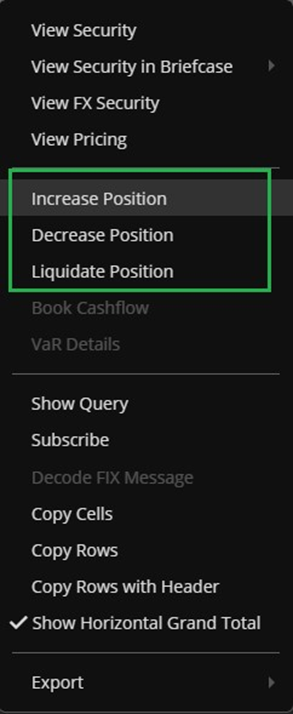
These actions will be offered only for tradable securities with Trade or Investment position order type. For example, for position marked with green in the screenshot below actions Increase, Decrease and Liquidate Position will be available while for position marked with red rectangle will not.

The bottom line, by using Portfolio Module you will be able to track your investments easily from anywhere and at any time. Also, by subscribing to a Portfolio Module`s View, you don`t even have to access Ruby, you will get the desired data to your e-mail, at the time of your choice.
