
Schedules in Ruby can be found in: Subscriptions, ETL, Scheduled Tasks (Valuation) and Alert Setup.
The usage of Scheduling, let`s say, tool is the same in any of these spots. You set the schedule using Cron expressions.
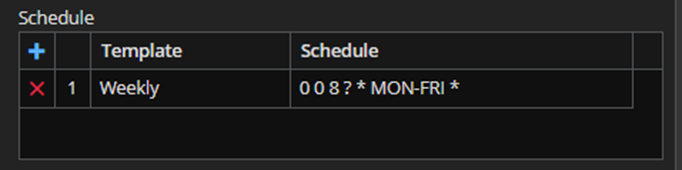
As shown in the screenshots below, by entering edit mode of the form/item you are in, you add a new Schedule by clicking on “+” icon or delete it by clicking on the “X“.
You can choose between two templates: Weekly and Custom. When you select the Weekly template (this template is chosen as default) and click on the schedule field, a user-friendly calendar will appear and you can easily schedule the execution of the process/subscription/task/rule.
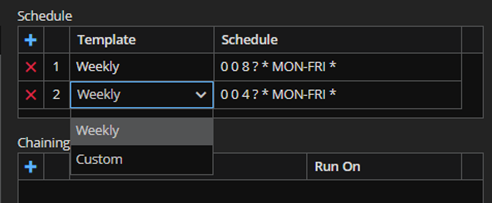
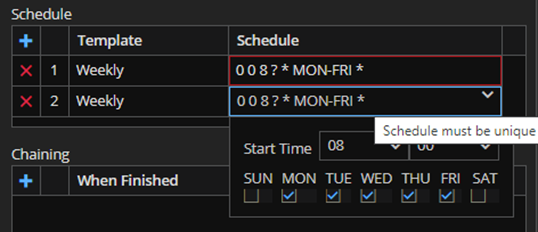
It should also be noted that each schedule should be unique.
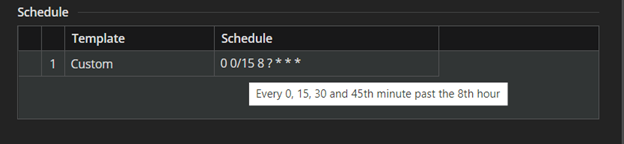
If weekly template is not suitable, you chose Custom and enter your own Cron expression.
For example, if we want to schedule a run in every 15 minutes past the 08th hour then we should use the following Cron expression:
Say, we want to set up the Cron schedule to receive a report only on the first of the month. In this case we should use the expression from the screenshot below: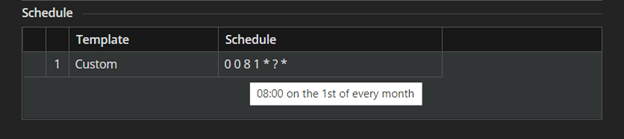
Or, every Wednesday at 10: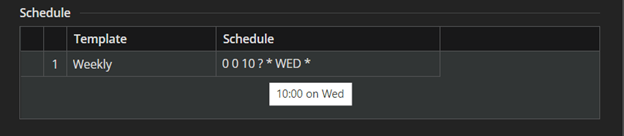 .
.
